Why too many WordPress admin options create decision fatigue
WordPress is flexible for a reason.
It can support blogs, business websites, online stores, membership systems, learning platforms, portfolios, booking systems, and much more. That flexibility is one of the main reasons WordPress remains widely used.
But flexibility also creates another problem that is discussed less often:
Too many admin decisions.
Most WordPress websites slowly accumulate options, toggles, menus, settings panels, plugin notices, and configuration screens over time. Individually, many of these additions are useful, but together, they can become mentally exhausting.
This is where decision fatigue starts to appear inside WordPress admin experiences.
Most admin decisions feel small individually
Many WordPress settings do not look important at first glance.
A checkbox here, or a dropdown there. A toggle for visibility. Maybe a plugin recommendation. A permission setting or a warning notice asking for attention.
None of these decisions seem overwhelming individually.
The problem is repetition.
Managing a website often means making a dozen of small admin decisions repeatedly in due course. Eventually, even simple actions start requiring more mental energy than what was expected.
This becomes especially noticeable on websites using many plugins.
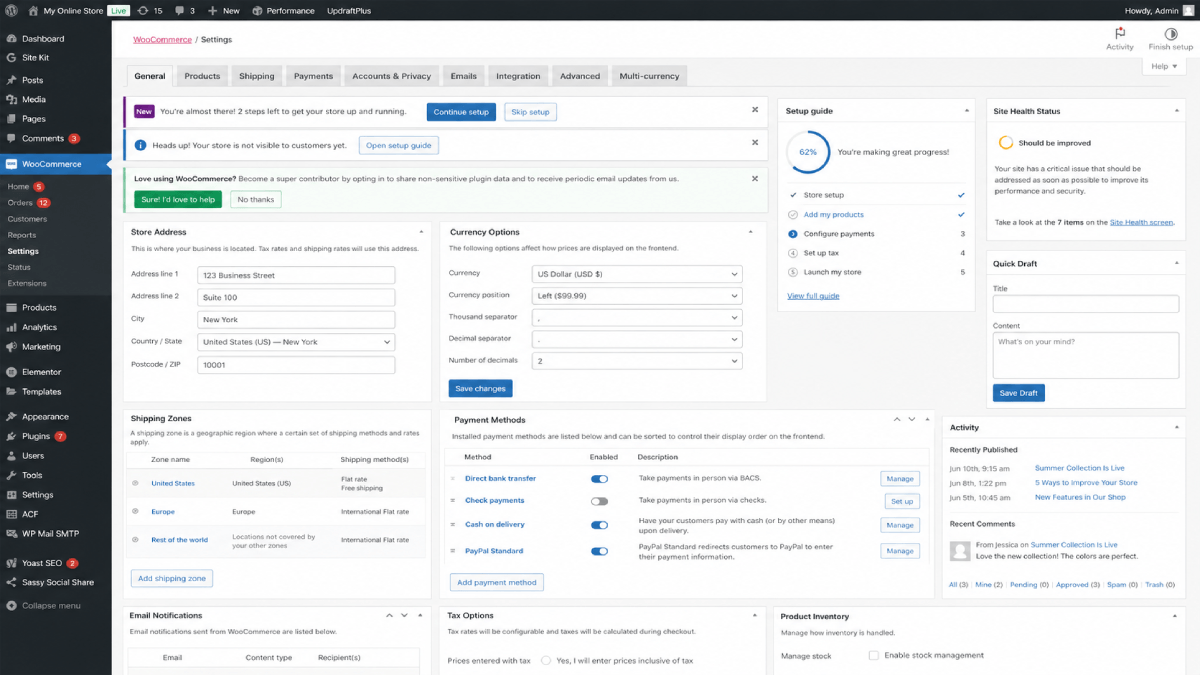
For example, installing a plugin like WooCommerce immediately introduces a large number of additional menus, workflows, notices, reports, settings, and configuration screens. This is understandable because complex plugins need complex functionality.
But from the perspective of someone managing the website daily, the admin environment also becomes heavier immediately after installation.
Too many visible options create uncertainty
One of the biggest hidden sources of admin fatigue is uncertainty.
People managing websites are often asking themselves questions like:
- "Can I safely change this setting?"
- "Will this affect the live site?"
- "Do I actually need this option?"
- "What happens if I disable this feature?"
- "Why are there multiple places controlling similar things?"
Even experienced users come up against these sometimes. Not because they lack technical knowledge, but because modern WordPress admin areas often expose a very large number of decisions at the same time.
When every option appears equally important, the admin experience starts feeling noisy and admins feel difficulty against confident navigation.
More options do not always improve usability
In software discussions, flexibility is often treated as an automatic advantage.
But usability also matters.
A dashboard that exposes every possible setting to every user at all times can slowly become harder to manage, especially for site owners who primarily want to focus on running their business, publishing content, or managing products.
In many cases, reducing unnecessary exposure to high impact admin actions can create a calmer and more approachable experience.
This is where concepts like guardrails and safe defaults become valuable.
Not because users should be restricted unnecessarily, but because not every admin action needs equal visibility during everyday website management.
For example, actions involving:
- permalink structures
- plugin installation
- theme installation
- sensitive settings
- advanced configuration areas
often carry more risk than routine publishing or editing tasks.
Separating high impact actions from day to day workflows can reduce hesitation and improve confidence during normal site management.
Decision fatigue affects developers too
This is not only a non technical user problem.
Developers and freelancers often experience admin fatigue while maintaining multiple client websites over time.
Each plugin introduces its own interface patterns, settings structure, notifications, and workflows. After years of maintaining WordPress sites, even adept professionals can feel the weight of operational complexity accumulating gradually.
The challenge is mostly not one individual plugin, rather its the combined cognitive load created by many systems competing for attention inside the same admin environment.
Better admin experiences are often more relaxing
Good admin experiences are not always the ones with the most features visible at once. In many cases, the best experiences feel calmer, more focused, and easier to navigate confidently.
This does not mean reducing WordPress flexibility.
It means thinking more carefully about how admin decisions are exposed, how sensitive actions are separated from routine workflows, and how unnecessary friction can be reduced over time.
As WordPress websites continue growing in complexity, usability and operational clarity become increasingly important parts of the long term site management.