Why WordPress admin starts feeling chaotic over time
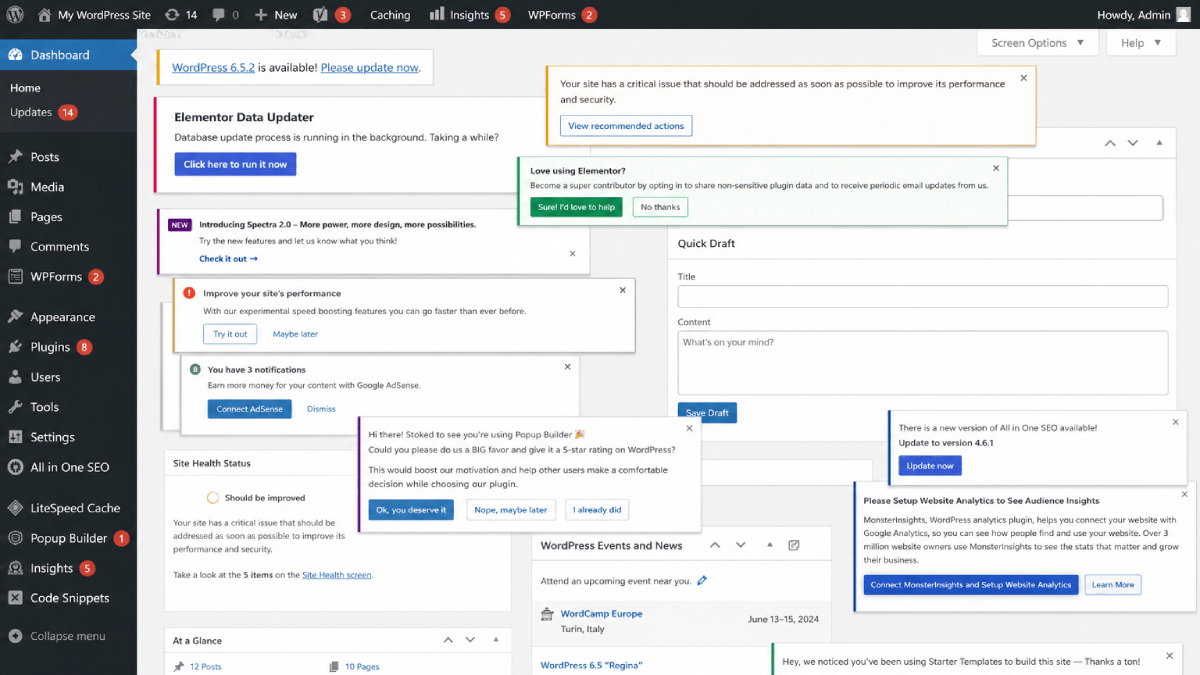
WordPress often starts simple with a clean dashboard, a few plugins, and a manageable sidebar. Everything feels easy to understand.
But over time, many WordPress sites slowly become harder to manage.
New plugins introduce their own menus and settings. Dashboard widgets compete for attention. Admin notices pile up. Important actions sit next to risky ones without much separation or guidance.
Nothing gives out exactly, but the admin area gradually starts feeling noisy, cluttered, and mentally exhausting.
This becomes especially noticeable for people managing their own sites. Not because they are inexperienced, but because WordPress admin panels often grow faster in complexity than they grow in clarity.
Chaos usually appears gradually
Most WordPress dashboards do not become overwhelming overnight.
The change usually happens little by little:
- One plugin adds a settings page
- Another adds dashboard widgets
- A page builder introduces its own interface
- SEO plugins add notices and recommendations
- Security plugins surface warnings and alerts
- Analytics tools introduce additional menus
- Forms, backups, caching, redirects, media optimization - each adds its own layer
Individually, none of these changes seem unreasonable.
But together, they slowly increase cognitive load.
Eventually, even simple admin tasks start requiring more attention than they used to.
Most plugins optimize for features, not clarity
This is understandable to some extent.
Plugin developers want their features to be discoverable. They want users to access settings easily. They want visibility inside the dashboard.
The problem is that every plugin is often designed independently. Very few plugins consider the long-term usability of the overall admin experience.
As a result, WordPress dashboards can slowly become fragmented:
- Different interface styles
- Different terminology
- Different navigation structures
- Different permission assumptions
- Different warning systems
Over time, this creates mental friction. Not necessarily because WordPress itself is difficult - but because the surrounding admin environment keeps accumulating complexity.
Non-technical site owners feel this first
People managing their own sites often experience this most intensely.
Many site owners are not developers. They are business owners, creators, educators, writers, freelancers, or small teams trying to keep their websites running smoothly. For them, the challenge is rarely "understanding technology."
The real challenge is uncertainty.
Questions like:
- "Can I safely change this setting?"
- "What does this option actually do?"
- "Will this affect the live site?"
- "Why are there so many admin notices?"
- "Which menu should I even use?"
When dashboards become crowded, even routine admin actions can start feeling stressful.
Even developers experience admin fatigue
This is not only a non-technical user problem.
Developers and freelancers experience admin fatigue too - especially when managing multiple websites over long periods of time.
As websites grow, the operational side of WordPress often becomes heavier:
- More maintenance tasks
- More plugin interactions
- More settings to remember
- More edge cases
- More opportunities for accidental changes
At a certain point, usability becomes just as important as features.
A dashboard that technically "does everything" is not always a dashboard that feels manageable day to day.
Why guardrails matter
One of the most overlooked aspects of WordPress admin design is the idea of guardrails.
Thoughtful boundaries around sensitive admin actions can reduce mistakes, lower stress, and make dashboards feel significantly more approachable.
Simple things can make a surprisingly large difference:
- Reducing unnecessary admin clutter
- Limiting exposure to risky settings
- Creating clearer workflows
- Separating advanced actions from routine tasks
- Making interfaces feel calmer and easier to navigate
These improvements are not only useful for site owners: they also benefit developers, agencies, and teams trying to create more maintainable WordPress environments.
Would guardrails make WordPress easier for your clients or site owners?
Complexity accumulates faster than clarity
WordPress itself is not the problem.
In many ways, WordPress succeeds because it is flexible and extensible.
The challenge is that websites often accumulate complexity faster than they accumulate clarity. Over time, that imbalance creates friction.
And increasingly, improving WordPress usability is not just about adding more features - it is about creating admin experiences that feel calmer, safer, and easier to manage over the long term.